Polling Rates Explained.
For over a decade, 1000Hz (1 millisecond) was the gold standard for gaming mouse polling rates. Recently, brands like Razer, G-Wolves, and Finalmouse have pushed this boundary to 4000Hz (4KHz) and even 8000Hz (8KHz). But does it actually matter?
The Math Behind the Marketing
Polling rate determines how often the mouse reports its position and click state to the PC.
- 1000Hz: Reports every 1.000 ms
- 2000Hz: Reports every 0.500 ms
- 4000Hz: Reports every 0.250 ms
- 8000Hz: Reports every 0.125 ms
The jump from 1000Hz to 4000Hz saves a maximum of 0.75 milliseconds of delay. In reality, because polling is asynchronous with frame rendering, the average savings is half of that (0.375ms).
The Monitor Refresh Rate Bottleneck
Higher polling rates only provide tangible benefits if your monitor is fast enough to display the updated information. At 60Hz, a new frame is drawn every 16.6ms. A 1000Hz mouse updates 16 times per frame. Updating 64 times per frame (4KHz) provides virtually zero visual smoothness benefit.
However, if you own a 240Hz (4.1ms) or 360Hz (2.7ms) monitor, the micro-stutters caused by the beat frequency between the mouse polling interval and the display refresh interval become visually apparent. This is where 4KHz shines—it eliminates "cursor stepping" during fast tracking scenarios.
The Battery Cost
Transmitting data 4 times as often requires significantly more power. A mouse that lasts 80 hours at 1000Hz will typically die in 20-25 hours at 4000Hz. You must weigh the minor latency/smoothness benefit against the inconvenience of charging every few days.
Visualizing Latency
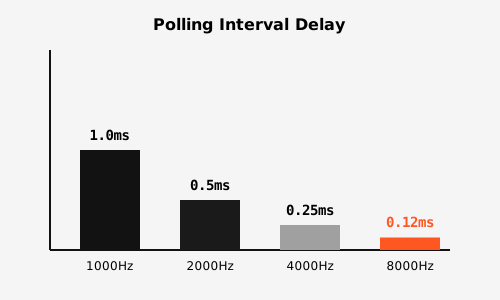
Figure 1: Maximum theoretical delay added by polling interval (Dated: 2024 testing).
Common Mistakes
- Using 4KHz on a 60Hz monitor: This provides zero visual benefit and only drains battery.
- CPU Bottlenecks: Older CPUs (pre-Ryzen 5000 / Intel 12th gen) can struggle to process 8000 USB interrupts per second, causing in-game stuttering.
FAQ
- Will 4KHz make me aim better?
- No. It will make visual tracking on a 240Hz+ monitor slightly smoother, but it will not fix bad aim mechanics.