Optical vs Mechanical.
For years, Omron mechanical switches dominated the gaming mouse market. However, a systemic issue with double-clicking forced the industry to pivot toward optical switch technology. But do they actually feel better?
The Mechanical Switch (The Old Guard)
A mechanical switch operates via a physical metal leaf. When pressed, the metal contacts touch, completing an electrical circuit.
- The Problem: When metal contacts touch, the electrical signal bounces. Firmware must implement a "debounce delay" (typically 2-10ms) to wait for the signal to stabilize before registering the click. Over time, as the metal oxidizes or loses tension, this bouncing gets worse, leading to the infamous "double click" issue.
- The Benefit: They provide a crisp, sharp tactile feedback that many enthusiasts still prefer. High-end mechanical switches like Huano Blue Shell Pink Dots offer incredible feel.
The Optical Switch (The New Standard)
Optical switches still have physical moving parts for tactility, but actuation happens when a shutter breaks an infrared light beam inside the switch housing.
- The Benefit: Because there are no electrical contacts bouncing, debounce delay is essentially zero. This lowers click latency significantly (often < 1ms) and completely eliminates the possibility of double-clicking due to hardware degradation.
- The Drawback: Early generations of optical switches felt notoriously "mushy" or hollow compared to mechanicals. Brands like Razer (Gen 3 opticals) and Logitech (Lightforce hybrids) have vastly improved the tactile feedback, but some purists argue they still lack the sharp snap of a good mechanical switch.
Visualizing Optical Actuation
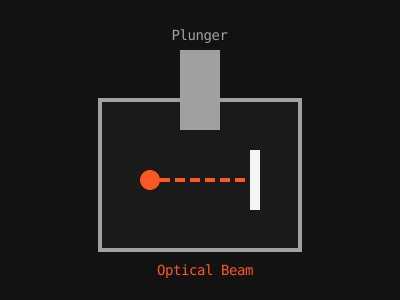
Figure 1: The plunger breaks an infrared beam to actuate the switch, bypassing physical debounce.
Common Mistakes
- Assuming all opticals feel the same: Razer Gen 3 opticals feel vastly different (and better) than early Cooler Master opticals. Implementation matters.
FAQ
- Can optical switches double-click?
- No, not through hardware degradation. If an optical switch double-clicks, it is a severe firmware bug, not a worn-out leaf.